


The last year of college finally arrived, and with it, the dreaded capstone project. Since I chose to do the research alone instead of in a group, I knew right away that I would need to be very organized to not miss any deadlines or meetings (or as we called them in college: "consultations") with my advisor. I tested several apps, from Evernote to the most random and unknown. None of them pleased me, whether it was because of usability or even the visual (after all, for me it was essential to use an app that was practical and visually appealing).
After a while searching, I saw a story of a girl using an app that seemed to be what I needed: cute, customizable, and practical. Through her, I discovered Notion, and since then, I've been in love with this program. In this post, I intend to make you fall in love with it too.
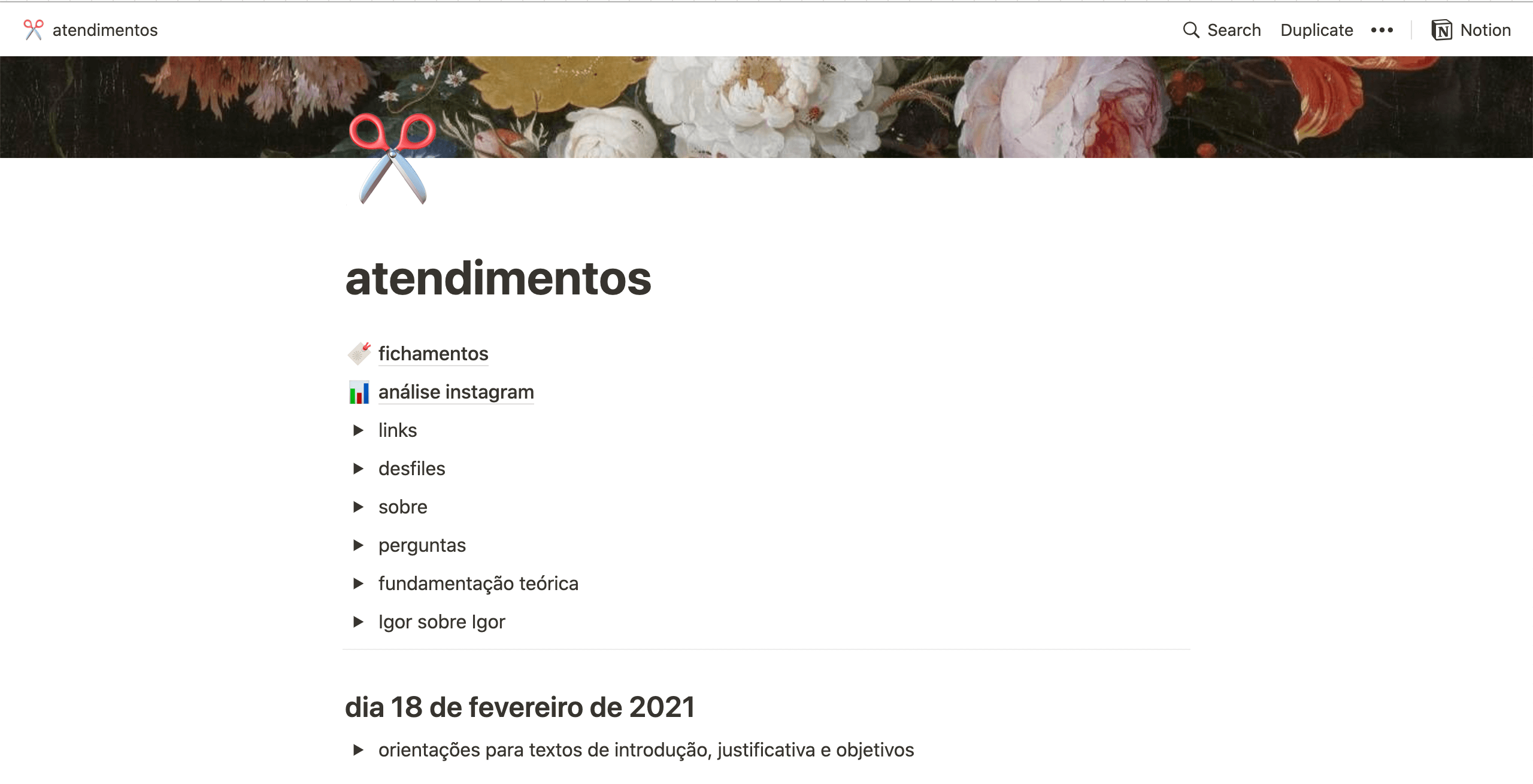
This was the homepage of my capstone project notebook.
How to use Notion to plan your Capstone Project
What is Notion?
It is a note-taking and task management application that can be used to improve productivity and organize tasks. It can be used online or as an app, which is available for mobile and computer. A very cool factor is that the program can be used in offline mode by the apps, so you always have access to the pages.The app has a free version for individual users (which I use!) and a paid version for companies.
How does Notion work?
I like to think of Notion as being made up of notebooks. In these notebooks, you can add pages for each theme or area you want to organize. In my Notion, one of the notebooks is dedicated to college, and one of its pages is dedicated to my capstone project. It might seem a bit confusing to read, but in practice, you'll see how super easy and intuitive it is.Notion and Meg Planner
Of course, I didn't abandon my Meg Planner: in it, I scheduled the days I would stop to write and revise past stages, as well as keep an eye on deadlines. The Planner was essential for everything to flow smoothly and not fall behind. God forbid I miss a key date, lol.How did I use it to organize each stage of my capstone project?
The first stage of my project involved researching the company I was studying. I needed to find books and articles to support the entire theoretical part, and since it was an online company, it was also necessary to gather links that could be important for developing the text.Thus, my Notion was divided into two main parts: the first was a collection of links + other important information, and the second gathered notes from meetings held with the professor.
Something I love about Notion is the ability to create several customizable topics according to what I need. It offers various text formatting modes, allows you to include images, videos, tables... I used one of the functionalities (to create toggle lists - in the app it's called "toggle list") to visually separate each topic. In each consultation, I created a list for the changes to the written work and in another, I wrote down the next steps.

In the collection of links, I highlighted everything I had found online (on social media, websites, blogs, online magazines, etc.) that could be useful at some point using the toggle lists. It was even possible to collect images and save them with the links, perfect for speeding up the time to write references.
An essential point - and one that I consider a super tip - was the table with summaries. I used a Notion theme composed of boards (very similar to Trello, in fact) and separated them into two columns with Books and Articles.

This is how my summaries looked: separated into blocks
I created a block for each book, with the title and author's name, to make it easier to find when I needed to make a citation. And inside each block, I wrote the phrases I found relevant for the theoretical foundation, along with the page numbers. To make it even easier, I also wrote the authors' data in ABNT format to create references more practically and quickly.In summary: I used the app as a repository for everything essential to the project's progress. In addition, I used a writing app to develop the texts and Meg Planner to control the dates. Having all the information organized practically was the key to everything working out.
You can download Notion from your phone's app store or their website (I highly recommend the desktop app; it's ultra practical)


Comments
Aahh que post legal e interessante, Raquel! Super explicadinho e organizado..obrigada! Tô amando ler os posts desse blog fofo e organizado :)
Aahhh que post legal, Raquel! Que explicadinho e organizado! Tô amando ler esse blog fofo :)
Olá!
Adorei a dica, mas como você fez para ter a versão em Português, Raquel?
Obrigada!
bjsss
Também sou #NotionLover e #MegMeger! Notion é personalizável, com design limpo, fácil de usar! Amei que a Quel também é adepta 💜